
Zamp for Xero: Setting up Customers and Products
Overview
After initially installing the Zamp application within your Xero instance, it is recommended that you take time to configure your customers and your products to ensure transactions are calculated and posted to Zamp accurately.
Setting up your Customers
Zamp’s integration will read details within your contact records in Xero. Exemptions however, are managed in the Zamp Tax App.
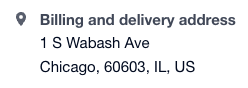
- Customer Address Information - Ensure each of your customers have their billing and shipping addresses populated for each customer record. This will be key for the most accurate tax calculations.
- Include the street address, city, state, and zip code. Otherwise, there may be errors posting transactions to Zamp.
-
- Customer Exemptions - Navigate to the Zamp Tax App.
- Click the Customer Entity Mapping tab within the application.
- For any exempt customers, map the appropriate exemption code to each respective customer.
- Ensure you hit Save.
Setting up your Products and Services
Your inventory can remain the same in Xero. Any tax category mappings are handled within the Zamp Tax App.
- Navigate to the Zamp Tax App.
- Click the Tax Code Mapping tab within the application.
- Your products and services should be automatically synced into the application.
Mapping Individual Products and Services
- Under the Zamp Tax Code, map one of the Zamp Product Tax Codes that appears in the dropdown.
- For a list of all Zamp Product Tax Codes, look here! If there are any questions regarding which code is best for an item, don’t hesitate to talk to your Zamp representative.
- Once finished, hit Save.
Mapping Products and Services in Bulk
- Hit Export.
- On column C, Zamp Tax Code, populate codes mapped to each item.
- Once completed, save your CSV.
- Once you are back into the Zamp Tax App, hit Import.
- Select your CSV, and ensure all of your items are successfully mapped.
- Hit Save.
Once your products are mapped, your items will now use Zamp Product Tax Codes to determine taxability on your transactions!